
Agent Fabric Overview
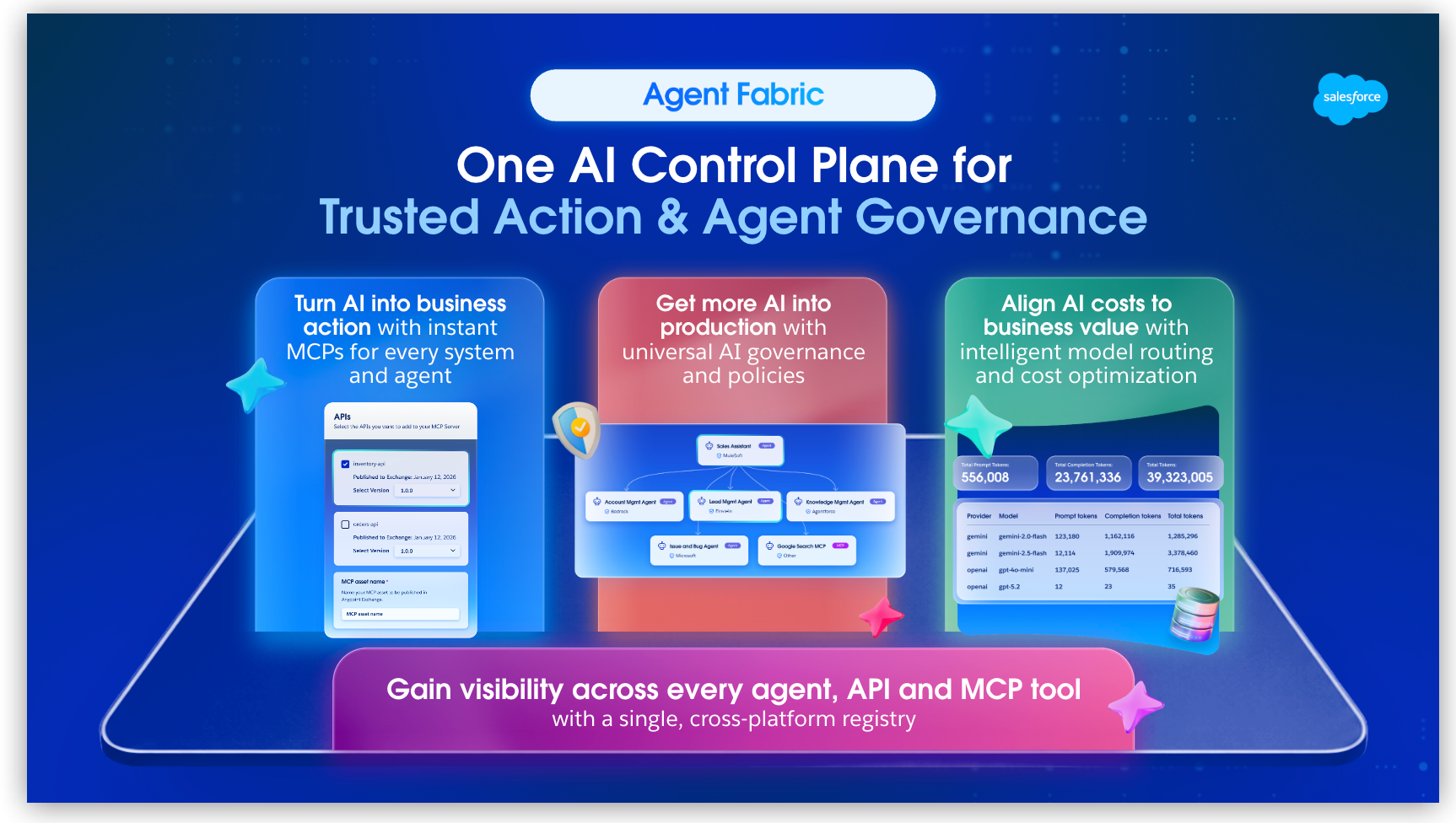
Teams build AI agents, MCP servers, and APIs across multiple platforms. As a result, it’s challenging to easily reuse, apply consistent security controls, or track end-to-end cost. Agent Fabric is the AI control plane for that landscape. With Agent Fabric, gain visibility across every asset, let agents take action in your existing tech stack, enforce universal policies at runtime, and see and optimize what your AI investments are costing.
How Agent Fabric Works
You can’t apply governance, security, or cost controls to agents you don’t know about. After you capture an inventory of agents, choose the jobs you need those agents to do.
-
Find every agent, MCP server, and API, and reuse what exists instead of rebuilding assets.
-
Make the APIs, applications, and agents you already run available as tools, so agents can update records and hand work to other agents without rebuilding the agents.
-
Put the same authentication, access, and security rules on every agent, MCP server, and LLM call, so production traffic is routed by your rules.
-
See where token spend goes, cap it, and stop paying frontier models for work smaller models can do.
Agent Registry
The registry is a single inventory of agents, MCP servers, APIs, and related services, regardless of which platform built them. Find what already exists, then keep the catalog current as new assets appear.
Registry
Teams rebuild agents and tools that already exist when they can’t find those assets. Besides your own agents, MCP servers, model proxies, APIs, and gateways, the catalog includes a curated set of public MCP servers from the Official MCP Registry and Informatica.
-
Find and reuse registered agents, MCP servers, model proxies, APIs, and gateways.
-
See conformance status and instance health before you use an asset.
-
Govern, monitor, and manage an asset’s lifecycle from the catalog page.
-
Publish agents, MCP servers, and APIs so other teams can reuse them.
Use the registry when you start a new agentic project and want to use existing assets or when you want to share assets built by your team.
Learn more: View Your Portfolio Overview
Scanners
Agents appear on platforms faster than teams can manually register them. Scanners watch supported platforms and automatically register any agents, APIs, and MCP servers they discover to the matching catalog in the registry.
-
Connect cloud providers as scanner sources.
-
Discover and register agents, MCP servers, and APIs on a schedule or on demand.
-
See last-run results and how many assets each scan found.
Use scanners when agents run on more than one platform and manual registration can’t keep the registry current.
Learn more: Adding Scanners from Providers
Enable Agents to Take Action
An agent that can only describe a problem can’t fix it. Agent Fabric exposes your APIs, applications, and agents as tools that those agents can call for help. If needed, Agent Fabric can even coordinate multiple agents when one isn’t enough.
Start by exposing existing APIs as MCP servers, and use an A2A bridge for agents that aren’t A2A-compliant. Add a broker when work spans specialized agents. Use connectors when agents need to call LLMs or other AI services directly.
Expose APIs as MCP Servers
Your APIs already do the work agents need them to do, but agents can’t call APIs as tools until you expose those APIs as MCP servers. MCP Bridge turns an existing API or SaaS system into an MCP server without custom code and without changing the underlying system.
-
Publish only the operations agents should call.
-
Apply existing governance policies to the resulting MCP server.
Use MCP Bridge when agents must call APIs you already have and you don’t want to build a custom MCP server.
Learn more: Create MCP Servers
MCP Connector
MCP Connector uses the Model Context Protocol so AI clients can invoke APIs, connectors, and apps from a Mule application. The resulting MCP server or client runs in Mule. As a server, the app exposes API-led investments, legacy systems, and SaaS applications that don’t natively support MCP. As a client, the app can call external MCP servers.
-
Expose Mule apps, connectors, and APIs as MCP tools and resources.
-
Run an MCP server or MCP client inside Mule, without a separate hosting environment.
-
Use Streamable HTTP (recommended) or SSE (deprecated) for transport.
Use MCP Connector when the tools agents need don’t map to a single existing API and you need custom Mule logic.
Learn more: MCP Connector
A2A Bridge
Agent Fabric orchestrates only A2A-compliant agents, but many enterprise agents, including Agentforce agents, aren’t A2A-compliant on their own. An A2A bridge presents those agents as A2A-compliant so they can join your network without being rebuilt.
-
Make a non-A2A agent A2A-compliant without changing the source agent.
-
Govern, monitor, and orchestrate the bridged agent like any native A2A agent.
Use A2A Bridge for agents that aren’t yet A2A-compliant. Use A2A Connector when you need custom Mule application logic.
Learn more: Make an Agent A2A-Compliant
A2A Connector
A2A Connector implements the A2A protocol in a Mule application so that application can act as an A2A server, an A2A client, or both.
-
Add A2A server and client support to a Mule application.
-
Let agents discover capabilities and delegate specialized tasks to other agents.
Use A2A Connector when existing Mule applications must participate as A2A-compliant agents.
Learn more: A2A Connector
Agent Broker
A broker is an intelligent router that orchestrates work across specialized A2A-compliant agents. It decides which agent handles which task and routes the request to the best-suited agent or broker.
You define the broker and its nodes in Agent Script (.agent files), a graph that mixes deterministic and non-deterministic actions. After you publish an agent network, brokers appear as specialized agents in Agent Registry and can be reused by other brokers.
-
Include MCP tools and other brokers in the routing graph.
-
Deploy the agent network, including the broker, to a CloudHub 2.0 shared or private space or to a Runtime Fabric target.
-
See connections and call volume in Agent Visualizer.
Use a broker when work spans multiple specialized agents.
Learn more: Define Your Agent Network
Other AI Connectors
Agents need the LLMs and knowledge stores you already operate. AI connectors give agentic workflows pre-built access to those models and vector databases so that you don’t need to write a custom integration for each one.
-
Invoke Agentforce agents and Amazon Bedrock foundation models from Mule.
-
Call LLMs through the Einstein Trust Layer or through inference APIs from multiple providers.
-
Use vector stores for search and RAG, and compose LLM, vector, and tool operations in Mule.
Use these connectors when a Mule application must call those AI services directly.
Learn more:
Agent Visualizer
Multi-agent systems are hard to operate when you can’t see how work moves through them. Agent Visualizer maps your agents, MCP servers, and LLMs, including agents from external platforms, to verify routing in development and find bottlenecks and failures in production.
-
See how agents, brokers, and MCP servers connect.
-
Watch live request flows and metrics such as latency, throughput, and error rates.
-
Compare historical patterns when a failure isn’t obvious in real time.
Use Agent Visualizer during development to verify the network, at deployment to confirm routing, and in production to troubleshoot.
Learn more: Agent Visualizer Overview
Monitor
A defined policy isn’t the same as healthy traffic. Monitoring shows latency, error rates, and request volume so that you can catch regressions and decide when to change policy or capacity.
-
View runtime health metrics for a service.
-
Compare signals across instances or environments.
-
Send alerts to Slack, Microsoft Teams, and email.
-
Use organization-wide dashboards when observability is enabled.
Use monitoring during development to validate performance and in production to meet SLAs and catch issues before they affect users.
AI Security and Governance
Agents that reach production without a defined security, identity, and compliance strategy become a risk, as different platforms enforce different rules, or even none at all. Define that strategy once, and Agent Fabric enforces it on live traffic across every agent, MCP server, and LLM call.
Omni Gateway
Omni Gateway is Agent Fabric’s runtime enforcement point: a single gateway that sits in front of your agents, APIs, MCP servers, and LLM traffic, regardless of the platform that built them. A managed instance of an API, agent, or MCP server puts Omni Gateway in the request path so policy enforcement applies across data privacy, authentication, compliance, cost controls, and monitoring.
-
Require authentication and authorization on agent, API, and MCP server requests.
-
Limit which tools and APIs an agent can call.
-
Keep an audit trail of traffic for security and compliance.
Use a managed instance on Omni Gateway when agents or APIs handle sensitive data, call external systems, or must follow the same runtime rules in every environment. LLM traffic uses a model proxy, which you also deploy to Omni Gateway.
Governance Strategies
Rewriting the same security, privacy, and cost rules for every agent and service doesn’t scale. A governance strategy defines those rules once and applies them across the agents, APIs, and MCP servers in scope.
-
Define rules once for access, data privacy, performance and cost, and compliance.
-
Apply them at the service or instance so live traffic matches the strategy.
-
See which services fail conformance.
-
Block or flag noncompliant activity.
Use governance strategies when agents, APIs, and MCP servers must follow the same auditable rules.
Learn more: Working with Governance Strategies
Universal Policies
On a multi-vendor gateway landscape, the same control is a different native policy on each platform, so gaps appear. Author the intent once with Universal Policies. MuleSoft translates it for each API gateway.
-
Author a policy once and apply it across gateways from multiple vendors.
-
Enforce common controls such as API key enforcement, CORS, header manipulation, IP allowlisting, and JWT validation.
-
Keep the same governance as services move or scale across platforms.
Use Universal Policies when you run gateways from more than one vendor and need the same controls on all of them.
Learn more: Universal Policies
Cross-Gateway and Third-Party API Governance
Services that run on a third-party API gateway still must meet your standards. Federated governance includes those APIs in the same conformance view so they don’t escape oversight.
-
Govern third-party APIs alongside MuleSoft-hosted APIs.
-
Monitor conformance across gateways from different vendors.
Use cross-gateway governance when APIs that matter to the business run on a connected third-party gateway and still need to meet your standards.
Learn more: Govern Third-Party Provider APIs and Monitoring Cross-Gateway Conformance
Security
A compromised, misconfigured, or malicious agent can leak data, take unauthorized actions, or drive unexpected cost. These controls detect that behavior, keep credentials in the vault you already use, and surface known risk on services you’ve already discovered.
-
Detect and contain rogue agents: Apply Rogue Agent Detection and Agent Kill Switch policies to each model proxy you want to protect. Detection flags risky behavior for your review. The Kill Switch policy blocks that agent’s access to the model proxy when you quarantine it. Quarantine always requires your review, and you reverse it if needed. Learn more: Detect and Contain Rogue Agents
-
External vaults: Register an external vault so credentials stay in AWS Secrets Manager, Azure Key Vault, or HashiCorp Vault. Only metadata is stored (zero-copy). Learn more: Using Credentials Stored in External Vaults
-
Akamai risk correlation: Correlate security findings to APIs and MCP services you’ve already discovered, so you can triage risk before it becomes an incident. Learn more: Correlating Risk Using Akamai API Security
AI Cost Control
LLM token spend grows without a single place to see it, cap it, or reduce it. Budget management shows that spend and caps it. Cost optimization reduces what each call consumes.
Model Proxy
Agents that call each LLM provider directly get a different endpoint, a different policy set, and a different bill. A model proxy, deployed to Omni Gateway, is one governed endpoint for multiple providers. Routing, caching, and policy run in front of every call. Token data from those calls feeds cost management.
-
Route by model or by meaning (semantic routing).
-
Reuse similar responses with semantic caching to cut latency and spend.
-
Apply policies, including the security policies that detect and contain rogue agents.
Use a model proxy when agents call LLMs and you need the same governance, routing, and cost visibility across providers.
Budget Management
Token usage and spend are visible, so you track and cap cost as needed. Set model costs so token counts read as dollars. Set budgets to limit spend or tokens over time. Use model wallets to cap a caller’s token or dollar spend against a provider.
-
Monitor token usage and spend across model proxies, agents, and MCP servers.
-
See which providers and model wallets are at risk or at their limit.
-
Set input and output token costs per model so reports read as dollars.
-
Set daily, weekly, or monthly budgets by spend or by tokens.
-
Cap a model-proxy caller’s token or dollar spend against a provider. After the budget is reached, the proxy blocks further requests to that provider’s models.
Use budget management when you need visibility and limits on LLM spend. Model wallets require an identity provider. Budgets are approximate: Usage can briefly exceed a limit before the proxy blocks requests.
Learn more:
Cost Optimization
A frontier model for a simple task, a repeated prompt, or a bloated payload all add cost without adding value. Optimization policies reduce token consumption for MCP servers, agents, and models without changing what the instance does.
-
Route by model or by meaning (semantic routing) instead of always using the most expensive model.
-
Reuse results for similar requests with semantic caching.
-
Trim unnecessary tools and payload with optimization policies.
Use cost optimization when token consumption is a significant cost and you want to reduce spend.
Learn more: Managing Costs and Token Usage
Supporting Tools
Anypoint Code Builder
You need a place to design and test an agent network before it hits production. Anypoint Code Builder is that environment: You configure agent interactions, develop custom MCP servers, and validate routing locally.
-
Design and configure agent network structures with the visual canvas.
-
Define routing logic and agent interactions in Agent Script.
-
Build and test agent workflows locally before deploying.
-
Develop custom MCP servers for specific integration needs.
-
Use MuleSoft Vibes to generate and validate network configurations from natural language.
Use Anypoint Code Builder when you need to design, test, or generate an agent network before you deploy it.
Learn more: Anypoint Code Builder Overview and Define Your Agent Network
MuleSoft Vibes
Hand-authoring a broker and agent network can be slow, and lead to mistakes at deploy time. MuleSoft Vibes, the AI assistant in Anypoint Code Builder, turns a description of the network you want into YAML and Agent Script and checks it against architecture best practices before you deploy it.
-
Describe your desired agent network in natural language and generate YAML configurations.
-
Validate network structure and routing logic against architecture best practices.
-
Move faster from initial design through testing and refinement.
Use MuleSoft Vibes when you want to draft or change project files from a description instead of authoring every file by hand.
Learn more: Getting Started with MuleSoft Vibes and Define Your Agent Network
What’s Next
-
For a guided path through the registry, agent actions, governance, and cost control, get started with the Agent Fabric learning map.
-
For the technical foundations and capability pillars, explore the Agent Fabric Technical Overview.
-
For architecture and orchestration design patterns, see the Agent Fabric Deep Dive.